There are two ways to adjust your child’s level: manually select a level or reset the placement test to determine the most suitable starting level (recommended).
How to Access Lesson Level Settings
1. Log in to your account using the email address and password you chose during the registration process.
2. Select Family Dashboard.
3. Select your child’s profile the left-hand side of the screen.
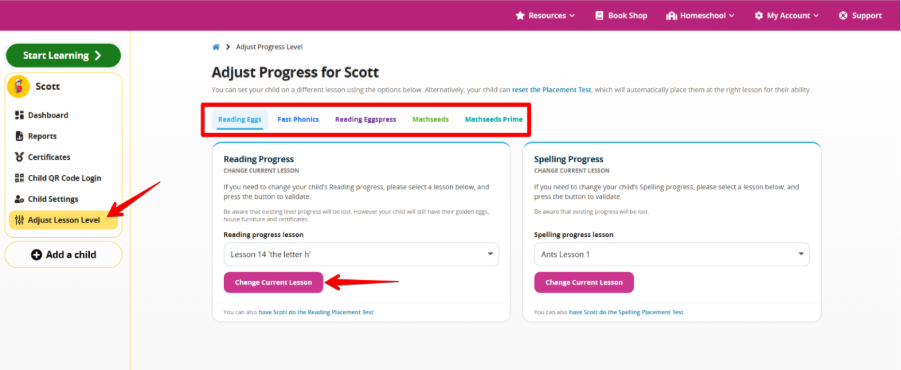
4. Select Adjust Lesson Level.
Adjust Lesson Level Manually
Select the relevant program and choose your desired lesson level. Select Change Current Lesson, then confirm your selection.
Reset the Placement Test
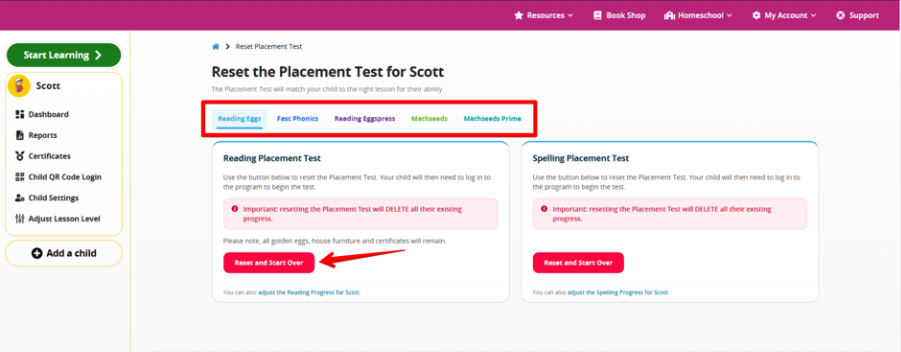
Select Reset the Placement Test, highlighted in blue at the top of the screen. Choose the relevant program, then select Reset and Start Over.
Things to Note
- Changes take effect the next time your child enters the program.
- Resetting the placement test removes your child’s level progress, but their golden eggs, critters, house furniture and certificates will remain.
- For school-linked accounts, contact your child’s teacher to request lesson level adjustments or a placement test reset.
Was this article helpful?
That’s Great!
Thank you for your feedback
Sorry! We couldn't be helpful
Thank you for your feedback
Feedback sent
We appreciate your effort and will try to fix the article