We’re sorry to hear you would like to cancel your subscription. Please follow the steps below based on where your subscription was purchased.
Apple App Store Subscriptions
Subscriptions purchased through the Apple App Store can be cancelled at any time.
Important Information
Transactions are between the purchaser and Apple.
We are unable to directly manage refunds or cancellations for App Store purchases.
How to Cancel
Follow Apple’s guidance here:
https://support.apple.com/en-us/HT202039
Google Play Subscriptions
Subscriptions purchased through Google Play can be cancelled at any time.
Important Information
Transactions are between the purchaser and Google.
How to Cancel
Follow Google’s guidance here:
https://support.google.com/googleplay/answer/7018481
Web Subscriptions
If you subscribed directly through our website, you can manage and cancel your subscription via your account.
How to Cancel
Log in to your Family Dashboard using a web browser:
https://app.readingeggs.com/parent/dashboard
(Subscriptions cannot be cancelled through the app — a web browser must be used.)Select My Account from the top-left menu.
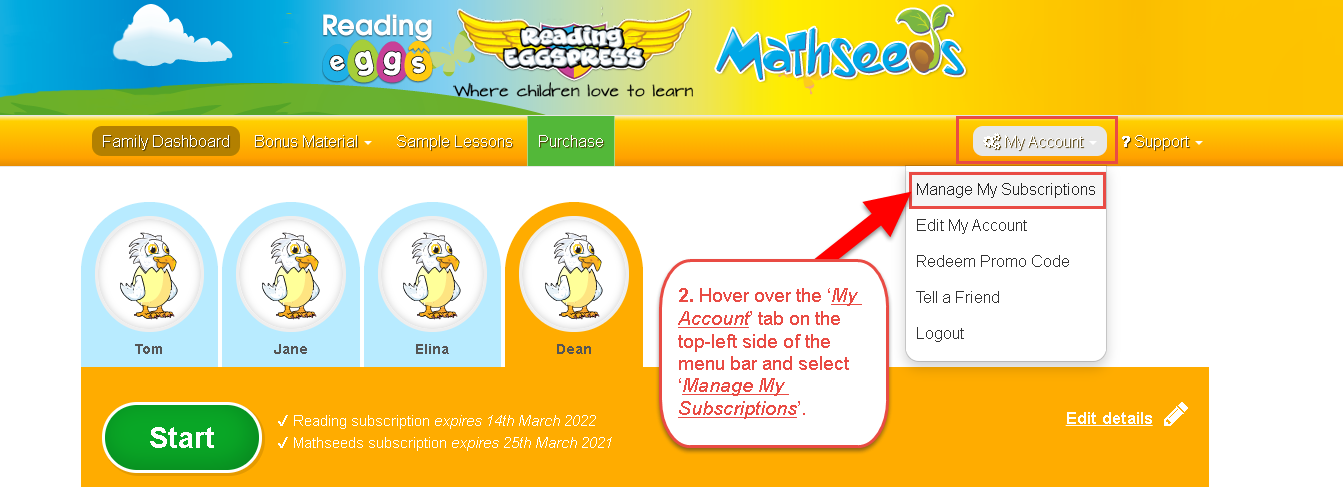
Choose Manage My Subscriptions.
Select Cancel next to the relevant subscription.
NOTE: We are currently testing our new Family Dashboard. If the version you are viewing differs from the content outlined above and you require support, please contact Customer Service team https://readingeggs.com.au/contact-us/
Important Information
Your cancellation must be submitted at least 24 hours before your renewal date to ensure you are not charged for the next billing cycle.
If you cancel your subscription, you will continue to have access until the end of your current billing period. Access will remain active until the next scheduled renewal date.
Your progress will be securely saved in your account, so if you decide to renew in the future, you can continue from where you left off.
Refund Policy
We offer a 30-day money-back guarantee.
Refund requests must be made within 30 days of purchase.
After 30 days, refunds are not available.
Was this article helpful?
That’s Great!
Thank you for your feedback
Sorry! We couldn't be helpful
Thank you for your feedback
Feedback sent
We appreciate your effort and will try to fix the article