We provide the option to turn off the background music for the Reading Eggs lessons, Storylands and Spelling as well as the Mathseeds lessons via the Family Dashboard.
1. Log in to your account using the email address and password you chose during the registration process.
2. Select your childs profile.
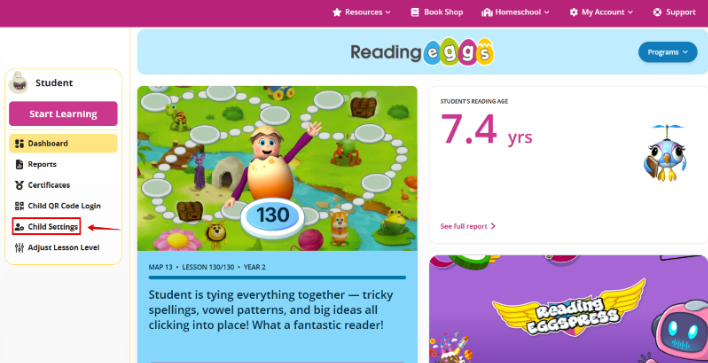
3. Select Child settings.
4.. Select Background Music and toggle it according to your preference.
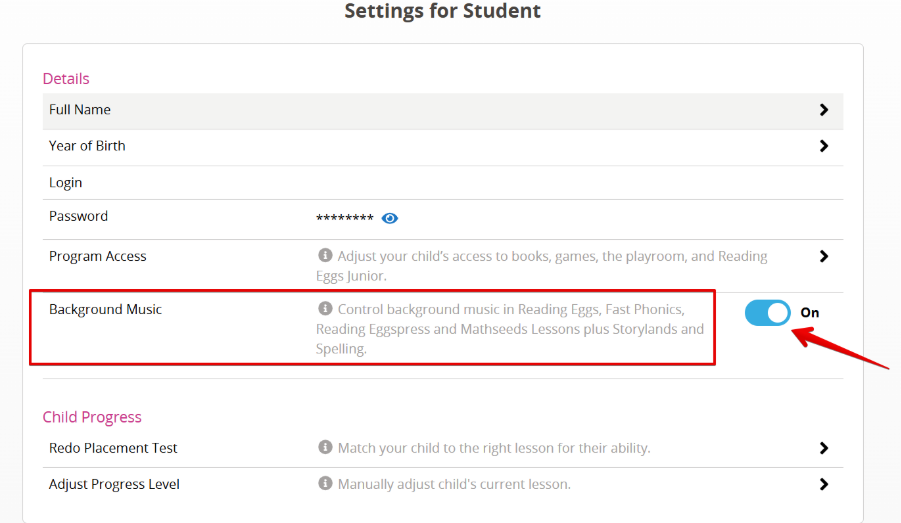
This can be done individually for each child via the ‘Child Settings’ option under each student's profile.
Was this article helpful?
That’s Great!
Thank you for your feedback
Sorry! We couldn't be helpful
Thank you for your feedback
Feedback sent
We appreciate your effort and will try to fix the article