To print your child’s certificates, please follow these steps:
- Log in to your account using the email address and password you chose during registration.
- Select your child’s profile
- Select Start Learning
- Choose the relevant program.
- Click on Awards or the Trophy area.
- Select the certificate you wish to print, then click Print.
Please note: For Fast Phonics, select My Progress, then scroll down to find the certificate section.
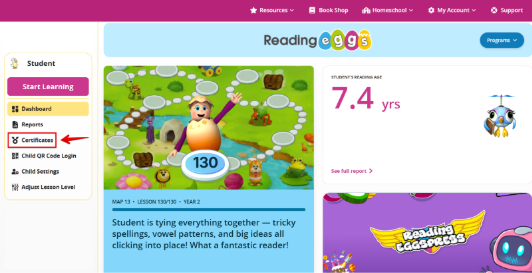
You can also view Reading Eggs and Mathseeds certificates by selecting the ‘Certificates’ option under your child’s student profile on the Family Dashboard.
Was this article helpful?
That’s Great!
Thank you for your feedback
Sorry! We couldn't be helpful
Thank you for your feedback
Feedback sent
We appreciate your effort and will try to fix the article